With iTunes Backup Manager v1.6 or later, you can edit (create, modify, delete) notes on computer then transfer back to your iPhone or iPod Touch, it’s more easily and powerful than edit notes on iPad, iPhone or iPod Touch, the steps:
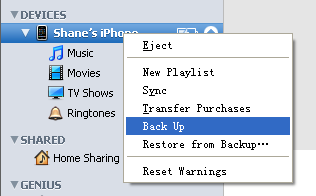
- Step 1: First, backup your iPad, iPhone or iPod Touch: for iBackupBot 4.0 or later, just connect your device to computer, select it in iBackupBot and click “Backup Now” in right side window. For iBackupBot 3.x, you can backup with iTunes: run iTunes, connect your iPad, iPhone or iPod Touch to computer, right click device’s name in left window and select Back Up in pop up menu, to transfer new contents from your iPhone or iPod Touch to computer:
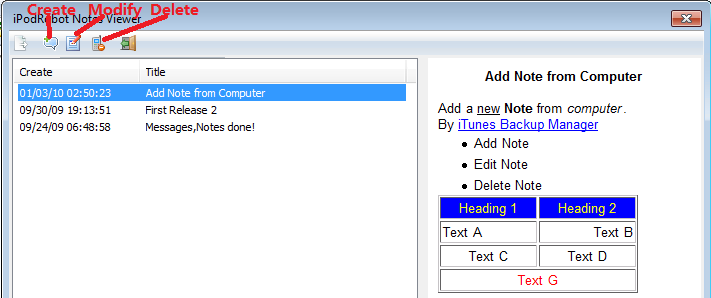
- Step 2: Run iTunes Backup Manager, click your iPad, iPhone or iPod Touch name in left window, then for iBackupBot 4.0 or later, navigate to User Information Manager and switch to Notes tab in right side window; for iBackupBot 3.x, select main menu->Plugin->Notes. Now you can create, modify or delete notes with pop up Notes Editor:
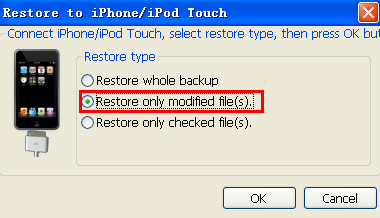
- Step 3: After edit done, for iBackupBot 4.0 or later, just click Restore button on the toolbar; for iBackupBot 3.x, you can select main menu->File->Restore, then select Only restore modified file(s) and press OK button, the program will transfer notes back to your iPhone or iPod Touch.
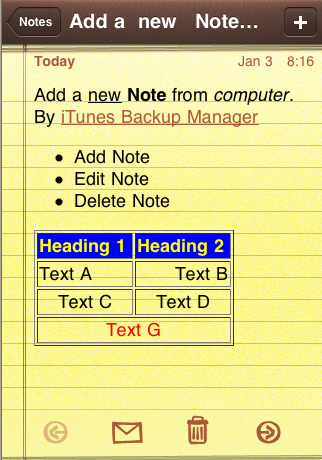
The most powerful thing is you can use HTML code in note’s body, like this:
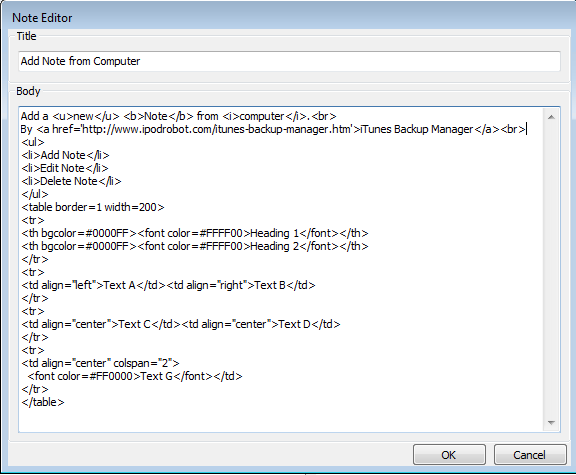
But currently, we haven’t built-in a HTML editor, you can edit the note’s content in an external HTML Editor, then copy and paste the HTML code to iBackupBot. You can try some free online HTML Editor.
The note with HTML code look like this on your iPad, iPhone or iPod Touch:
Other products:
iPod to Computer Transfer
Free iPod Video Converter